Choosing eSIM, SIM Cards, or Pocket Wi-Fi in Japan
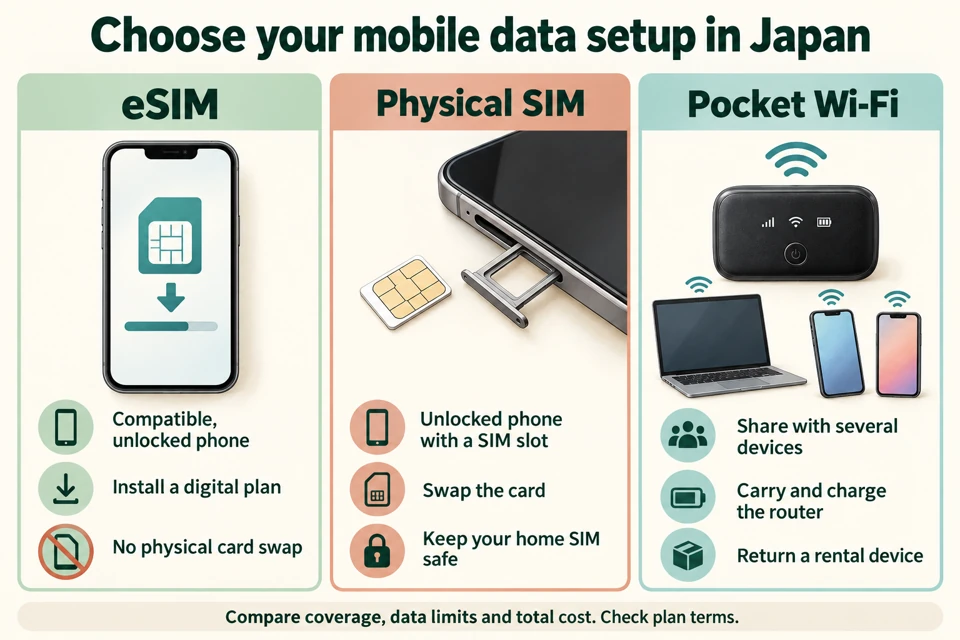
Visitors to Japan have three ways to get mobile data. An eSIM is built into the phone and activated by scanning a code, so you add a plan without swapping cards. A physical SIM is a plastic card you insert into the phone. A pocket Wi-Fi is a small battery-powered router you rent and carry. It creates its own Wi-Fi network that your phone, laptop, or tablet joins.
For one traveler with an unlocked, eSIM-capable phone, an eSIM is the simplest choice. A pocket Wi-Fi makes more sense when several people need a connection at once or when a phone cannot take an eSIM. Coverage is high across Japan’s national mobile network, but rural and indoor performance is harder to measure. The coverage section below sorts official figures from vendor claims. Prices change often, so confirm every rate with the provider before you book.
Check Your Phone Before Buying
Before you buy any eSIM, your phone must meet two conditions. It must be unlocked, which means the carrier that sold it no longer restricts which network it accepts. It also must have eSIM hardware. A Japan eSIM compatibility guide lists iPhone XR and XS or newer, Pixel 4 or newer, and Galaxy S20 or newer as the minimum models. Other guides list older Pixel models, such as the Pixel 3 or 3a, as eSIM-capable. The oldest Pixel with eSIM support differs from one guide to another, so check your own phone’s model rather than relying on a model name.
The fastest check is to dial *#06# on the phone. The screen shows an EID number, which is typically 32 digits, next to the IMEI. The EID confirms the phone has eSIM hardware. Some phones show a second EID line, so scroll through the whole screen. CD Japan’s eSIM guide also describes how to check the carrier lock on an iPhone under Settings, then General, then About, then Carrier Lock.
Two model-specific details can catch travelers off guard. Some phones sold in mainland China or Hong Kong ship without eSIM hardware. A carrier-locked phone may refuse a travel eSIM. If your phone is locked, ask the carrier that sold it to unlock it before you leave home. The fact that US-market iPhones are eSIM-only does not tell you anything about phones bought elsewhere, so check your own model.
Setting Up an eSIM Step by Step
Setup takes a few steps, and most of the work happens before you land. The steps below follow the order eSIM sellers usually describe:
- Dial *#06# to confirm the phone is unlocked and supports eSIM.
- Buy a data plan online from an eSIM provider and pick how many days and how much data you need.
- Receive the QR code or activation code by email, which one provider says usually arrives within minutes.
- Scan the QR code. On an iPhone, go to Settings, then Cellular, then Add eSIM. On an Android phone, go to Settings, then Network & Internet, then SIMs, then Add eSIM. Some Android phones use Connections and then SIM Card Manager instead.
- Turn on the eSIM line and enable data roaming for it. Once you land, the phone connects to a Japanese network.
The setup needs a stable Wi-Fi connection and the QR code from the provider. CD Japan’s guide claims setup can take under five minutes, but that is a seller’s estimate. Timing matters most. Whether a profile installed at home activates automatically on arrival depends on the provider and carrier. Ask the provider before departure whether the plan activates on first use or on the first day you connect, and whether you need data at install.
If your phone is dual-SIM, you can usually run your home SIM alongside the eSIM. That lets you keep your home number for calls and texts while using Japanese data. Check your home carrier’s roaming charges before you rely on that arrangement.
Whether a Passport Is Required
No official rule requires visitors to show a passport to buy a prepaid eSIM or physical SIM in Japan. Providers that sell tourist plans don’t mention a passport check, so confirm the requirement with the seller before you travel. Bring your passport anyway, because the seller may ask for it when you buy a physical SIM at a counter.
The identity rules you may find online apply to residents, not visitors. Japan Life Support’s guide to monthly SIM contracts says foreign residents holding residence cards or special permanent resident certificates issued on or after 14 June 2026 must choose delivery-time identity verification for SIM contracts. That rule covers only monthly contracts, so short-term visitor plans fall outside it.
Physical SIM Cards and Their Prices
A physical SIM works in any unlocked phone that accepts a standard SIM card, so it suits older phones without eSIM hardware. The drawback is that you need to find a shop or vending machine and then swap the card into your phone. Some major airports have SIM vending machines. A MATCHA guide to Japanese SIM and eSIM options gives a price of 2,000 yen and above for 1GB over six days from a Narita terminal machine. That article is undated, so confirm the machine’s current price before you buy.
Other undated examples in the same guide include Nippon SIM at 1,980 yen for 30 days with 3GB, and Sakura Mobile at 4,950 yen for eight days and 7,150 yen for 15 days. The same guide lists Mobal, an eSIM, at 1,920 yen for eight days with 1GB. Prices from this kind of comparison are useful for a rough range, but they are not current quotes.
Among short-term tourist eSIMs, only Mobal includes a Japanese phone number with calling, according to one comparison. Sakura Mobile offers a Japanese number on longer monthly plans. If you need a local number to receive calls or to verify accounts, check the plan’s voice terms before you buy.
Monthly plans from Japanese mobile operators are a different product. Japan Life Support’s IIJmio page lists IIJmio eSIM plans from 440 yen for 2GB to 2,240 yen for 35GB. Those are standing monthly contracts, which suit people staying several months. They are not designed for a two-week trip.
Two older visitor products also appear in the research, and both are out of date. In January 2024, IIJ announced a Japan Travel SIM eSIM that went on sale at about 14,700 Lawson stores from 6 February 2024. Its seven plans were priced in yen, excluding tax, and each was valid for 30 days. The IIJ press release also says the plan uses NTT docomo’s 3G network, and that network shut down at the end of March 2026. A separate October 2024 release from DXHUB listed plans from 1,780 yen for five days with 1GB per day, and from 2,980 yen for 30 days with 10GB total, as sold on several online shops. Check whether either product is still sold before you count on it.
Pocket Wi-Fi Prices and Terms
Pocket Wi-Fi rentals suit groups because one device serves several phones, tablets, and laptops. The main providers mentioned in the research are Ninja WiFi, Sakura Mobile, Japan Wireless, Anyfone, and JRPass. Their prices come from their own pages, which show no dates, so check each rate before you book.
Ninja WiFi lists its Infinite Unlimited plan on SoftBank at 1,980 yen per day. Its capped SoftBank plans run from 440 yen for 1GB per day up to 1,320 yen for 10GB per day, and the company lists prices with tax included. Sakura Mobile shows a headline price of 299 yen per day, but the same page’s simulator puts an unlimited 25-day rental at 31,500 yen, which works out to about 1,260 yen per day. The headline figure appears to depend on conditions the page does not spell out, so ask what the 299 yen rate includes before you rely on it. Sakura Mobile says its unlimited data covers up to 15 devices. Anyfone lists a 5G unlimited pocket Wi-Fi on KDDI at 860 yen per day with tax included. The Japan Wireless page quotes its unlimited plan at both US$3.60 and US$5.2 per day, so ask for the exact figure at checkout. JRPass lists rentals from US$59.00 for five days. Its high-speed data is capped at 5GB per day, after which the speed "slows down considerably," and it supports up to five devices.
The word "unlimited" means different things across these providers. Anyfone and Japan Wireless say their plans have no daily cap or throttling. JRPass caps high-speed data at 5GB per day. Ninja describes peak-hour restrictions. If you plan to stream video or upload photos every day, read the fair-use and throttling terms before you pay.
Deposit, cancellation, and late-return terms vary by provider. Ask about each one before you book. Anyfone publishes a clear insurance table. Standard insurance costs 220 yen per day. With insurance, the customer pays 22,000 yen if the device is lost or damaged and 5,500 yen for the SIM card. Without insurance, the device liability is 44,000 yen, and the charger, bag, and battery add to that amount. The table covers liability only. The page does not say how the company handles a deposit.
Ninja WiFi offers free pickup and return at airport counters, while a delivery pickup or return costs 550 yen, and a rental of five to 10 units carries a 1,100 yen one-way fee, tax included. Sakura Mobile lets you collect at Narita, Haneda, Kansai, Fukuoka, and New Chitose airports. You can also collect at a local post office or have the device delivered to your accommodation. You can return the device to any postbox. Japan Wireless offers same-day airport pickup and next-day hotel delivery, and it asks you to return the device with a prepaid envelope by 3:00 PM on the day after your rental ends. Anyfone lets you return devices at airport stores or in 24/7 drop boxes.
Coverage in Cities and Along Routes
Nationwide figures from the Ministry of Internal Affairs and Communications (MIC) show that population coverage is high. MIC reported that 5G covered 96.6% of the population in fiscal 2022, which ended in March 2023, and 98.1% in fiscal 2023, which ended in March 2024. In fiscal 2023, MIC said it had reached its 97% target for fiscal 2025 two years early. MIC also reports that mobile phone service overall covered 99.99% of the population as of March 2025.
Those population figures measure how many people are covered. Land area is a separate measure. For the March 2025 survey, MIC reports area coverage that is lower than population coverage, and the scope of that figure is not stated. That gap means a city traveler and a hiker on a remote trail will see very different results, even when both are in Japan.
Coverage in major cities and transit hubs is strong. Travel SIM Asia’s guide to Japan’s carriers describes NTT docomo, au by KDDI, SoftBank, and Rakuten Mobile as the four networks, with the first three described as nationwide and Rakuten as newer with limited rural reach. Sakura Mobile’s carrier comparison rates docomo’s underground coverage as top-tier and SoftBank’s coverage on the Tokyo subway as good. These are vendor assessments, not measurements. Measured figures for underground or tunnel 5G coverage are not available for any year.
Data is mostly available on the Shinkansen, but no route-by-route or carrier-by-carrier measurement covers the bullet train. If you need a dependable connection on a long train ride, download maps and bookings before boarding.
Coverage in Rural Areas and Tunnels
Outside cities, 4G carries most of the traffic. Several guides say 5G is thinner in rural areas, and travelers typically fall back to 4G in mountains and small towns. One vendor says most rural tourist destinations, including historic towns, hot-spring resorts, national-park gateways, and coastal villages, have 4G from at least two of the three main carriers. The same vendor warns that a populated area does not mean continuous signal across every mountain, forest, or remote island.
Vendors consistently rank NTT docomo as the strongest carrier in rural, mountain, and island areas. SoftBank is described as weaker in some rural and mountain areas, and one vendor says its coverage thins out as you move away from main routes. None of these rankings came from independent testing, so treat them as informed opinion. If you plan to hike in a national park or visit a remote island, check which carrier your plan uses and ask the provider about its network there.
Speed figures add another layer of uncertainty. One recent comparison reports median 5G download speeds of 168 Mbps for docomo, 128 Mbps for au, 115 Mbps for SoftBank, and 128 Mbps for Rakuten, as an eSIM coverage guide lists them. Another comparison, measuring all networks, reports different rankings. Speed depends on the test method, so none of these figures should decide which carrier you choose. Provider maximums, such as the 612 Mbps listed for one SoftBank-based pocket Wi-Fi, are marketing figures, not measured speeds.
Which Network Your Plan Uses
Most eSIM and pocket Wi-Fi plans run on one of the four Japanese networks. Some sellers resell access to a major carrier’s network, which makes them mobile virtual network operators, or MVNOs. Plans on the same network can deliver different speeds and data policies, so the network name alone does not settle the choice.
Provider network claims don’t always agree. One guide says Airalo connects to KDDI au and SoftBank, while another says Airalo uses docomo or SoftBank. Because the network mapping varies, check the seller’s own network list before you buy. Rakuten Mobile is the least common choice for travel plans. Rakuten’s network covers cities and main routes and roams on au elsewhere, and roaming can be slower or limited in data. Rakuten’s roaming limits are not quantified here.
NTT docomo may not sell prepaid tourist SIMs directly. One report says docomo withdrew its Japan Welcome SIM in 2023 and that third-party sellers now sell docomo network access. Check both the seller and the network before you buy.
Choosing the Right Option for Your Trip
For a solo traveler who has an unlocked, eSIM-capable phone, an eSIM is the default. You buy the plan before you leave. When you land, you scan the code to connect. You have no card to lose, and you do not need to hunt for a store at the airport.
A pocket Wi-Fi fits better when two or more people need data at the same time, when one traveler has a phone without eSIM hardware, or when laptops and tablets need the connection. A pocket Wi-Fi also leaves your phone’s own data plan untouched. The cost rises with the number of days, and the cost per person falls as the group grows. The main drawbacks are that you have to carry the device and keep it charged. You also have to return it.
A physical SIM suits a phone that cannot take an eSIM, and it makes sense if you want a Japanese phone number on a longer stay. Airport vending machines are convenient for a short-term plan, but only one undated price is listed for them, so compare it with an eSIM before you buy.
| Option | Phone requirement | Devices supported | Setup | Key limits in the research |
|---|---|---|---|---|
| eSIM | Unlocked, with eSIM hardware | One phone, plus any additional eSIM slot | Scan a QR code before or after arrival | Activation timing unclear; carrier lock can block it |
| Physical SIM | Unlocked phone that takes a standard SIM | One phone | Buy and swap the card | Few visitor plans listed; prices undated |
| Pocket Wi-Fi | Any phone or laptop with Wi-Fi | Up to 5 (JRPass) or 15 (Sakura Mobile) | Collect at an airport, post office, or hotel | Deposit, cancellation, and late-return terms vary by provider |
Whichever option you choose, check the provider’s own page before you pay. Confirm the rate, the data cap, the number of devices, and the cancellation policy there. Many prices here are undated or date from 2023 to 2025, so the current rate may be different.
Key Takeaways
- Check your phone first: Dial *#06# to find the EID number and confirm the phone is unlocked. Do this before you buy any eSIM.
- Choose an eSIM for a solo trip: An eSIM suits one traveler with a compatible phone. You scan the code instead of visiting a store.
- Rent a pocket Wi-Fi for groups: A pocket Wi-Fi covers several devices at once, but read the cap, fair-use, and insurance terms before you book.
- Verify the rate and terms directly: Many prices here are undated, and deposit, cancellation, and late-return terms differ by provider, so ask the provider before you pay.
- Plan for weaker signal in rural areas: Expect 4G outside cities, and confirm your carrier’s coverage before you travel to mountains, islands, or remote national parks.